
TB Theatre Theme
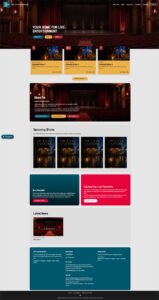 A WordPress theme built for theatres, arts venues and dramatic societies. It was created by Tyburn Brook Creative Agency and has been running on a real, live theatre website since day one.
Built around how theatres work
TB Theatre Theme is not a generic template with a theatre photo on the front. It is designed around the things a venue actually needs: an events calendar that keeps changing, a website every visitor can use comfortably, and a team who can run it without calling a developer.
Everything that belongs to your venue, from its name and logo to its address, links, homepage wording and footer, is changed in the WordPress admin. There is no code to edit.
Key features
Events and shows that look after themselves. Give an event or production a start and end date. When it finishes, it drops off the site and the next one moves up. There are no old listings to delete.
A working accessibility toolbar. Every page has tools your visitors can really use: several contrast and colour-filter modes, a dyslexia-friendly font, adjustable text size and spacing, read aloud and a reading guide. The theme remembers each visitor’s choices as they browse.
Your choice of layout. Show the site full width, or in a centred, boxed column with a colour of your choice either side. Switch between them in the Customizer, and set the width of the box.
Your own colours. Change the main colour, accents, text and backgrounds from the Customizer to match your venue’s branding.
Mobile first. Pages load quickly and work well by touch, with a proper mobile menu rather than a shrunken desktop one.
Page templates included. A landing-page “Hub” template groups related links with images. A Staff and Team template lists people across several categories, and you can drag them between categories. Both are managed from the WordPress editor.
Sharing and printing done properly. Every page has share buttons for Facebook, X, Bluesky, WhatsApp, LinkedIn and email, and a print stylesheet that gives a clean printout rather than a raw copy of the screen.
The small details. Reading times on posts, styled image captions, accordion-style FAQs and sensible defaults throughout.
Licensing and pricing
TB Theatre Theme is licensed rather than sold. You pay for the right to use it on your website, and the code stays the property of Tyburn Brook Creative Agency.
| First year | £50 |
| Each year after that | £100 |
The licence is non-exclusive, which means other organisations can license the same theme. It covers one website and renews every year.
How it works. After you pay, you are sent a licence key for your website’s address. You paste it into Appearance → Theme Licence in WordPress. The key is checked on your own site, so nothing is sent anywhere to do it. If a key runs out, you get a 14-day grace period, during which a notice appears. After that, the WordPress admin is limited to the licence page until a renewed key is entered. Your public website stays online throughout and none of your content is touched.
Free trials. We sometimes offer a free trial of between one and twelve months, at our discretion. Ask us if you would like to try the theme first.
Updates. While your licence is valid, new versions of the theme appear in WordPress as a normal update that you install with one click. Every update is digitally signed and checked before it installs.
The full terms are in the licence agreement. It does not need to be signed. By paying for the licence, or by activating the theme, you agree to it. You can read it at any time in Appearance → Licence Agreement, where your organisation’s name, website address and start date are filled in for you.
Is it right for you?
TB Theatre Theme suits venues, dramatic societies and arts organisations that want a website made for them without paying for a build from scratch. It is a particularly good fit if a properly working accessibility toolbar and a self-maintaining events calendar matter to you.
Get in touch
Would you like to license TB Theatre Theme for your venue, ask about a free trial, or see it running on a live site? Email hello@tyburnbrook.co.uk and we will talk it through.
Latest version: 1.2.7
Changelog
Version 1.2.7 – 26 August 2026
- New: a Colours section in the Customizer (Appearance > Customize > Colours). Change the main colour, accents, text, backgrounds, hover shades and more, with a reset to the original for each.
Version 1.2.6 – 25 August 2026
- New: a Changelog page in the WordPress admin (Appearance > Changelog).
- Improved: the licence pages now show the contact email for buying or renewing a licence.
Version 1.2.5 – 24 August 2026
- Fixed: share icons stay readable when hovered.
Version 1.2.4 – 23 August 2026
- Fixed: the accessibility toolbar’s “Show Tooltips” option now shows a clear label when you hover over or tab to any button or icon, including share, social and menu controls.
Version 1.2.3 – 21 August 2026
- Improved: the licence agreement shown in WordPress now covers update checks, and the theme’s README has been rewritten for new venues.
- Improved: a server that cannot check licence keys no longer restricts the site.
Version 1.2.2 – 20 August 2026
- Fixed: a text logo now has proper contrast on every page, and long venue names no longer push the menu button off small phones.
- Fixed: the dropdown menu image no longer defaults to another venue’s logo.
Version 1.2.1 – 18 August 2026
- Fixed: the default menu (shown before a menu is set up) is now built correctly.
- Fixed: sidebar event and news pictures no longer create empty links for screen readers.
Version 1.2 – 16 August 2026
- New: proper “page not found”, search results and archive pages in the theme’s style.
Version 1.1.1 – 14 August 2026
- Fixed: the address the theme checks for updates has been corrected, so updates are found.
Version 1.1 – 12 August 2026
- New: choose between a full width or boxed website layout in the Customizer, with an adjustable width and background colour.
- Improved: drop-down menus now stay inside the box in boxed layout.
Version 1.0.1 – 10 August 2026
- Housekeeping release. No visible changes.
Version 1.0 – 8 August 2026
- First release.
- Self-managing events and shows, with start and end dates.
- Accessibility toolbar with contrast modes, dyslexia-friendly font, text controls, read aloud and a reading guide.
- Hub and Staff page templates.
- Share and print tools, reading time, accordion FAQs and a mobile-first menu.
- Venue name, logo, links, homepage wording and footer all editable in the WordPress admin.